Your First Parser
Learn the core concepts of Parsanol and build your first complete parser.
The Two-Stage Model
Parsanol separates parsing into two distinct stages. This separation is crucial for debuggability, flexibility, and reusability.
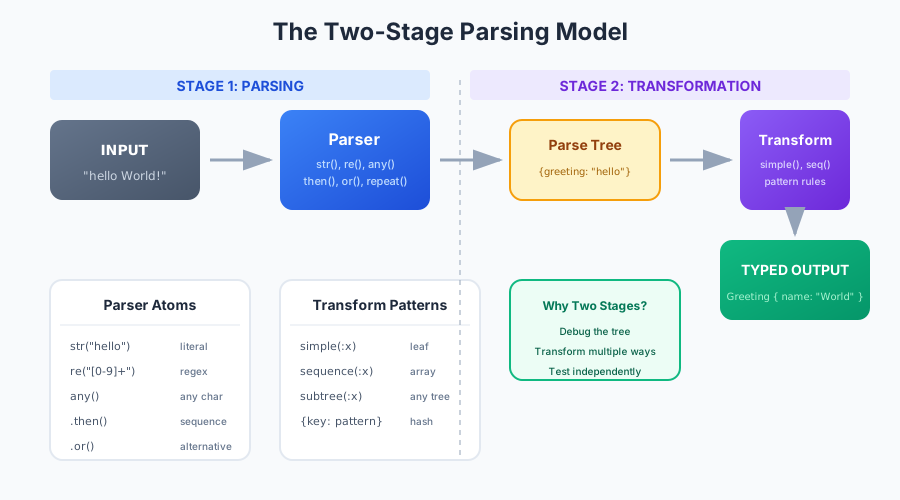
Stage 1: Parsing
- ✓ Input: Raw string
- ✓ Output: Generic parse tree
- ✓ Grammar defines structure
- ✓ No semantic meaning yet
Stage 2: Transform
- ✓ Input: Generic parse tree
- ✓ Output: Domain objects
- ✓ Rules define semantics
- ✓ Full type safety
Why separate? The parse tree is generic and debuggable. You can inspect it, visualize it, or transform it multiple ways. The transform stage adds meaning to the structure.
Anatomy of a Parser
A parser in Parsanol is built from atoms (basic matching units) combined with combinators (composition operators).
Key Concepts
- Atoms: str(), re(), any() - match literal text, regex, or any character
- Combinators: then(), or(), maybe(), repeat() - compose atoms
- Labels: .as("name") - attach names to captures
Parse Tree Structure
The parser outputs a generic tree structure that represents the matched input.
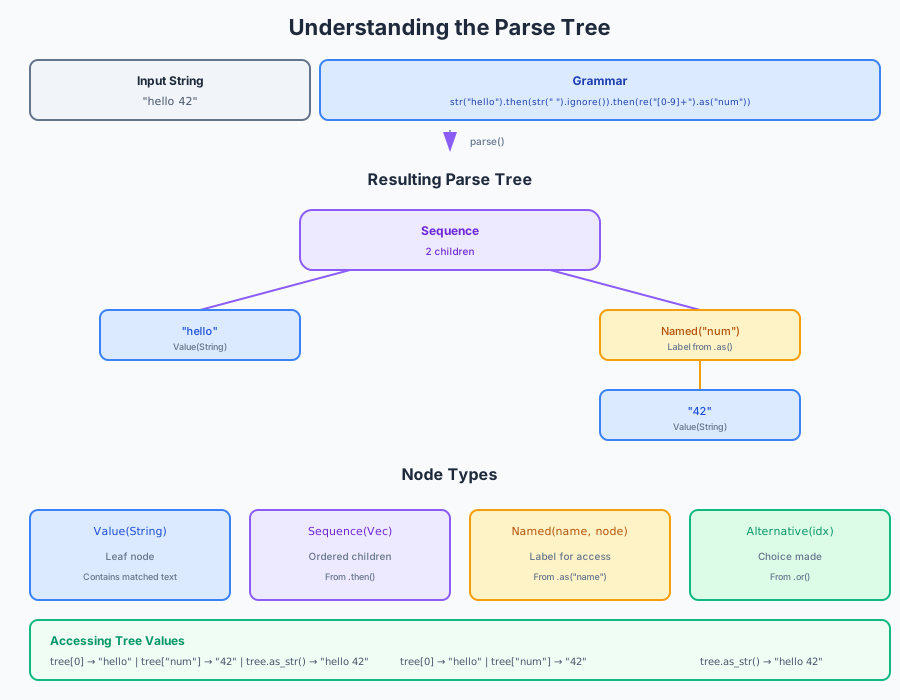
Str
Matched literal string with position
Array
Ordered sequence of child nodes
Hash
Named captures (from .as())
InputRef
Reference to input substring
Anatomy of a Transform
Transforms convert the generic parse tree into your domain objects using pattern matching.
Pattern Matching
Rules match specific tree patterns and extract bound values
Recursive
Transforms recursively process nested structures
Type-Safe
Output is strongly typed Rust structs or Ruby objects
Composable
Multiple transforms can be chained or combined
Building Your First Parser
Let's build a simple calculator parser that can evaluate expressions like 1 + 2 * 3.
Result
The expression 1 + 2 * 3 correctly parses as 1 + (2 * 3) = 7
due to operator precedence!
Choosing a Backend
Parsanol provides multiple parsing backends. The backend determines how your grammar is executed.
| Backend | When to Use | Performance |
|---|---|---|
| Packrat | Captures, dynamic atoms, complex grammars | O(n) time, O(n × r) memory |
| Bytecode VM | Simple patterns, expressions, memory-limited | 10-32x faster, O(depth) memory |
| Streaming | Large files (logs, CSV) that don't fit in RAM | Bounded memory, ~5-10% overhead |
When to Use Captures
Captures let you extract specific values from your input without building a full transform pipeline. Think of them like named groups in regular expressions.
✓ Use Captures When:
- • You need to extract specific fields from input
- • You want to avoid building a full AST
- • You're parsing structured data (JSON, logs, CSV)
- • You need zero-copy extraction of substrings
✗ Skip Captures When:
- • You need the full parse tree anyway
- • You're doing complex transformations
- • You need type conversion (str → int)
Example: Extract Email Parts
Related Features
- • Scope atoms: Isolate captures in nested structures (each level has its own captures)
- • Dynamic atoms: Change parsing based on captured values (context-sensitive)
- • Learn more about captures, scopes & dynamic atoms →